Solutions for Trade Contractors
Built for
Field Crews.
Electricians, plumbers, framers and all trade contractors - Buildster gives your foreman and field crew a dedicated tool to share blueprints, live checklists, photos, deficiencies and tasks assignments, without the chaos of email and texting.


Trades using Buildster

Electricians

Plumbing & Mechanical

Framing & Drywall

Roofing

Flooring

Painters

Kitchen Cabinets

Interior Finishing
The Problem
Your crew is running on texts and group chats
Most trade contractors manage job site communication with a mix of WhatsApp groups, iMessage threads, and emailed PDFs. Tasks and blueprints get lost, and nobody knows what's done until someone asks. There's a better way.

Tasks fall through the cracks
Verbal instructions and texts get missed. Nobody knows what's assigned, what's done, or what's still open.

Blueprints are all over the place
Accessing drawings on site means hunting through emails or phone storage.

One flat
rate
Existing platforms charge $30–50 per user per month. With 15+ crew members and constant personnel turnover, that's a hard sell.
Why Buildster
Field management built for how trades actually work

Unlimited users, one flat subscription
Add your whole crew without worrying about headcount. Personnel churn doesn't cost you extra.

Tasks pinned directly to blueprints
Assign work by pinning tasks to the exact location on the plans. Context is built in, no back-and-forth needed.

Live checklists
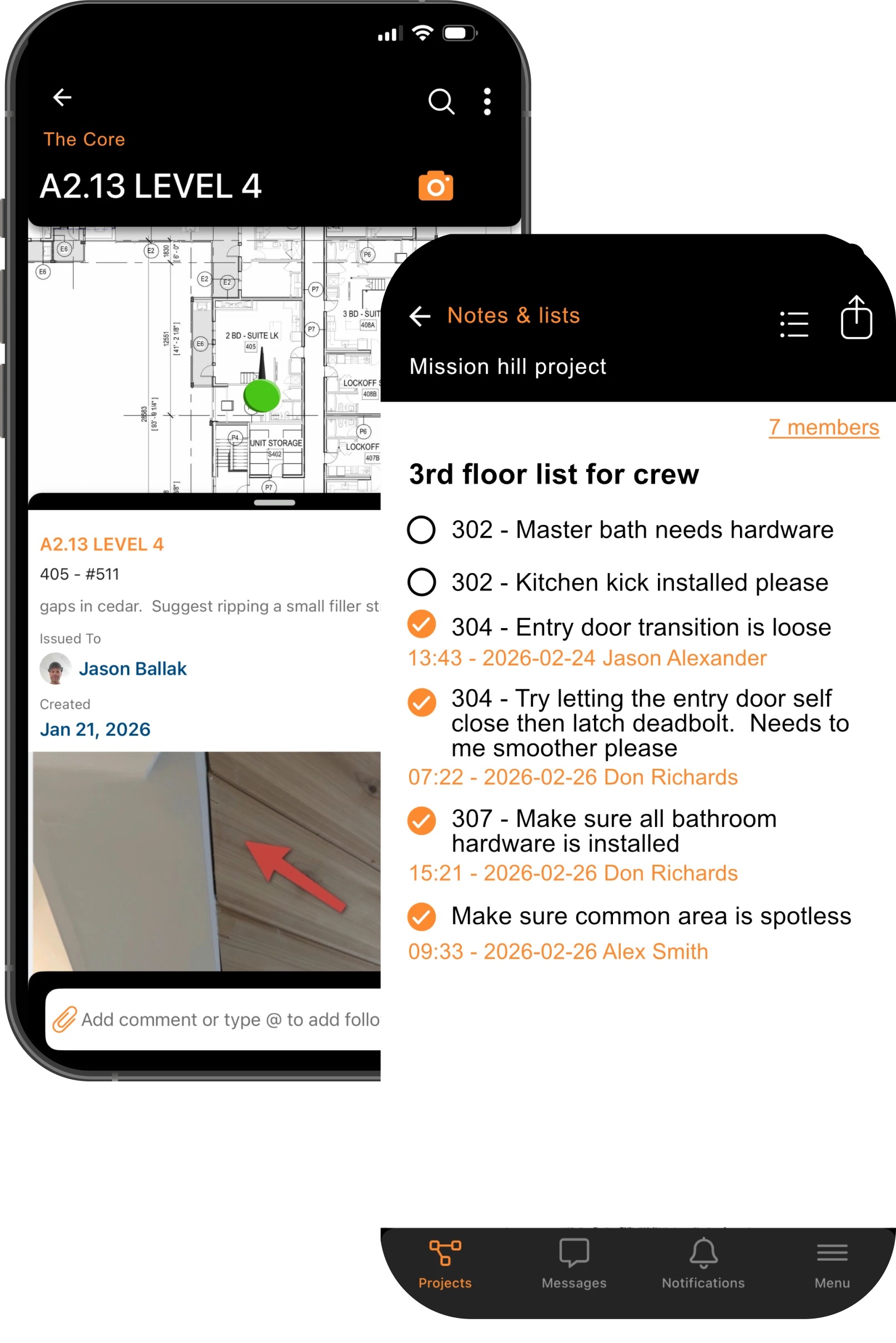
Create and share live checklists with your crew and know what’s getting done. Time stamped completion lets you know who and when each item gets checked off.

All blueprints, shared instantly
Upload individual or multiple blueprint sets just once. When your crew logs in, they are automatically shared.
Key Features
Everything your foreman needs on site
- Blueprint Sharing & ViewingEvery crew member gets instant access to full drawing sets. Favourite the sheets you use most. Search by page number or title. No more emailing PDFs.
- Live Notes & ListsCreate and share checklists with your crew, and see exactly who checked off what and when.
- Task PinningPin tasks, questions, and issues directly to blueprint locations. Add photos, comments, and annotations. @mention crew members to loop them in. Every pin has a full conversation history that lives forever in the project.
- MessagingGroup message your whole crew from inside the project. No more collecting phone numbers or setting up WhatsApp groups that outlive the job. All conversations are organized by project and accessible to anyone on the team.
- Photo ManagementKeep all your site photos in one shared place, organized with colour tags & keywords so anyone can find what they need fast.
- Linked PhotosAttach photos to specific locations on a blueprint so your documentation is always tied to where the work actually happened.
- Inspection WalkthroughsLog deficiencies on site, assign them automatically, and get daily reports on what's done and what's still outstanding.
Case Study
Brasada Inc: Multi-Family Interior Finishing
Company type: Interior finish contractor
Project types: Multi-family residential construction projects
Team size: 4–8 team members
About
Brasada inc is a Calgary based interior finishing contractor specializing in the multi family residential construction sector. Brasada is responsible for supplying and installing residential doors, trim and hardware for projects ranging in size from 80 units to 300 units.


The challenge
Managing crews on multi-family construction projects has its challenges.
Challenge #1
Identifying and logging deficiencies throughout a project is hard to manage. Many suites look the same, so it’s easy to lose track of where things are across multiple units and floors. Crew members can also have a hard time remembering what needs to be done. In the end, a lot slips through the cracks and finishing a job takes longer than it should.
Challenge #2
Since Brasada supplies the material as well as installs it, documenting successful installations is critical. If items get damaged by other trades, it can cause friction with the builder/GC over who is responsible. Without proof, Brasada often has to absorb the cost.
Challenge #3
Distributing ongoing checklists is hard to manage. iPhone notes can be shared and collaborated on, but not with Android users. When a list of 15 to 20 items needs to go out, the only options are texting it to everyone or printing it out. Management has no way of knowing what got completed, so constant follow-up is required.

How Buildster helped
Buildster helped with all three of these items.
Win #1
The ability to drop pins on a blueprint gives both foreman and employees a simple way to log and remember things. Tasks or deficiencies can be assigned to specific people directly on the pin. If others need to be brought in, a quick @mention gives them all the info instantly. Deficiencies are visible across the blueprints and notifications are sent when they’re completed. It’s visual and everyone instantly gets how it works.
Win #2
The photo documentation feature lets foreman and employees drop and rotate directional arrows onto blueprints and attach photos to them. Photos are timestamped and easy to find. On one recent project, crews installed more than 600 mirrored doors and every one was photo documented after installation. If anything was later damaged, the proof was there and findable in seconds.
Win #3
Using Buildster’s Notes feature, the foreman can quickly write a checklist and share it with the team. When someone checks off an item, everyone can see who did it and when. The whole team knows what’s outstanding without asking. Everyone can comment if needed and everything is in real time. This feature has been a game changer.
Results
One app that elevates everyone’s ability on site.
Employees have more agency to organize their own work, and management has more confidence in communication.
The number of toolbox meetings needed has gone down.
The whole team stays more connected on any given job.
At final walkthroughs, there is a big reduction in close-out deficiencies, because they were captured and dealt with earlier by the team.
Browse Additional Case Studies and Projects
READY TO BRING PROCESS TO YOUR SITES?
Join the beta and see Buildster in action with your crew.